


Page 167 - Learn To Program With Scratch
P. 167
When a button is pressed, its sprite moves a little bit down and to the
                          right to give the visual effect of a button press. When the mouse is released,
                          the sprite returns to its original position and sets the value of the variable
                          choice to indicate that the user clicked that button. Note that each sprite
                          sets choice to a different number. The blocks for moving the buttons in
                          these scripts are not strictly necessary and can be removed if desired.
                             Once the user chooses a triangle type, choice becomes greater than zero,
                          and the main script calls the CheckAnswer procedure. This procedure com-
                          pares the type variable (which specified the type of the drawn triangle) with
                          the value of the choice variable. If the two variables have the same value,
                          then the user’s answer was correct. Otherwise, the user’s answer was wrong,
                          and the script will say the correct classification.


                                                   try it out 6-2
                            Open this game and play it a few times . Once you understand how it works, try
                            adding some extra functions . Here are a few ideas:
                            •   Make the game keep score . It could add a point for each correct answer and
                                deduct a point for each incorrect answer .
                            •   Give the user an option to quit the game .
                            •   Define a criterion for ending the game . For example, you could set the main
                                repeat loop to run 20 times instead of forever . You could also stop the game
                                after five incorrect answers .
                            •   Have something exciting happen while the game is running . For example,
                                you might create a variable named specialNumber and assign it a random
                                value at the start of the game . When the number of correct answers matches
                                specialNumber, the game could give the user bonus points, play music, or
                                even tell a joke .
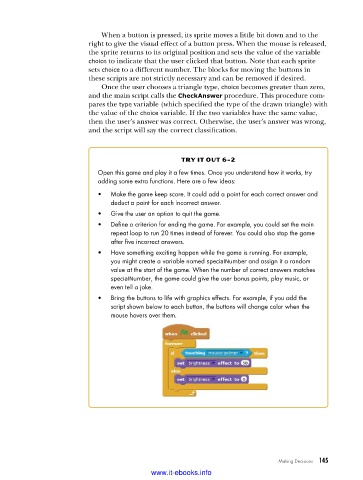
                            •   Bring the buttons to life with graphics effects . For example, if you add the
                                script shown below to each button, the buttons will change color when the
                                mouse hovers over them .


                                                                              Making Decisions   145

                                           www.it-ebooks.info

