


Page 165 - Learn To Program With Scratch
P. 165
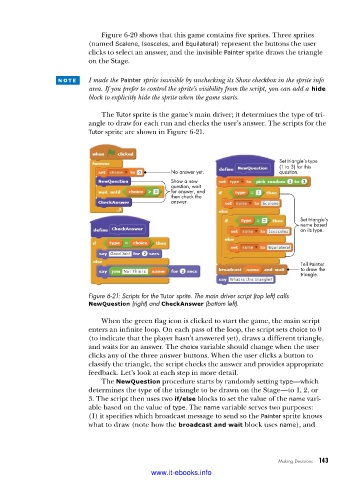
Figure 6-20 shows that this game contains five sprites. Three sprites
                          (named Scalene, Isosceles, and Equilateral) represent the buttons the user
                          clicks to select an answer, and the invisible Painter sprite draws the triangle
                          on the Stage.

                 n o t e    I made the  Painter sprite invisible by unchecking its Show checkbox in the sprite info
                          area. If you prefer to control the sprite’s visibility from the script, you can add a  hide
                          block to explicitly hide the sprite when the game starts.

                             The Tutor sprite is the game’s main driver; it determines the type of tri-
                          angle to draw for each run and checks the user’s answer. The scripts for the
                          Tutor sprite are shown in Figure 6-21.


                                                                               Set triangle’s type
                                                                               (1 to 3) for this
                                                 No answer yet.                question.
                                                 Show a new
                                                 question, wait
                                                 for answer, and
                                                 then check the
                                                 answer.

                                                                                    Set triangle’s
                                                                                    name based
                                                                                    on its type.


                                                                                     Tell Painter
                                                                                     to draw the
                                                                                     triangle.


                          Figure 6-21: Scripts for the Tutor sprite . The main driver script (top left) calls
                          NewQuestion (right) and CheckAnswer (bottom left) .

                             When the green flag icon is clicked to start the game, the main script
                          enters an infinite loop. On each pass of the loop, the script sets choice to 0
                          (to indicate that the player hasn’t answered yet), draws a different triangle,
                          and waits for an answer. The choice variable should change when the user
                          clicks any of the three answer buttons. When the user clicks a button to
                          classify the triangle, the script checks the answer and provides appropriate
                          feedback. Let’s look at each step in more detail.
                             The NewQuestion procedure starts by randomly setting type—which
                          determines the type of the triangle to be drawn on the Stage—to 1, 2, or
                          3. The script then uses two if/else blocks to set the value of the name vari-
                          able based on the value of type. The name variable serves two purposes:
                          (1) it specifies which broadcast message to send so the Painter sprite knows
                          what to draw (note how the broadcast and wait block uses name), and


                                                                              Making Decisions   143

                                           www.it-ebooks.info

