


Page 166 - Learn To Program With Scratch
P. 166
(2) it is used in the CheckAnswer procedure to create the user’s feedback
                         message. When the Painter sprite finishes drawing, the NewQuestion pro-
                         cedure prompts the user for an answer with the say command.
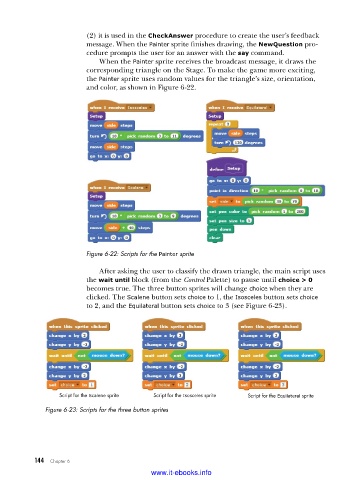
                             When the Painter sprite receives the broadcast message, it draws the
                         corresponding triangle on the Stage. To make the game more exciting,
                         the Painter sprite uses random values for the triangle’s size, orientation,
                         and color, as shown in Figure 6-22.


                         Figure 6-22: Scripts for the Painter sprite

                             After asking the user to classify the drawn triangle, the main script uses
                         the wait until block (from the Control Palette) to pause until choice > 0
                         becomes true. The three button sprites will change choice when they are
                         clicked. The Scalene button sets choice to 1, the Isosceles button sets choice
                         to 2, and the Equilateral button sets choice to 3 (see Figure 6-23).


                  Script for the Scalene sprite   Script for the Isosceles sprite   Script for the Equilateral sprite
              Figure 6-23: Scripts for the three button sprites


           144   Chapter 6
                                           www.it-ebooks.info

