


Page 168 - Learn To Program With Scratch
P. 168
Line Follower

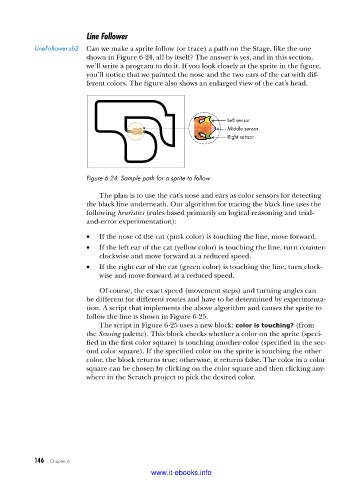
           LineFollower .sb2  Can we make a sprite follow (or trace) a path on the Stage, like the one
                         shown in Figure 6-24, all by itself? The answer is yes, and in this section,
                         we’ll write a program to do it. If you look closely at the sprite in the figure,
                         you’ll notice that we painted the nose and the two ears of the cat with dif-
                         ferent colors. The figure also shows an enlarged view of the cat’s head.


                                                                Left sensor
                                                                Middle sensor
                                                                Right sensor


                         Figure 6-24: Sample path for a sprite to follow

                             The plan is to use the cat’s nose and ears as color sensors for detecting
                         the black line underneath. Our algorithm for tracing the black line uses the
                         following heuristics (rules based primarily on logical reasoning and trial-
                         and-error experimentation):
                         •   If the nose of the cat (pink color) is touching the line, move forward.
                         •   If the left ear of the cat (yellow color) is touching the line, turn counter-
                             clockwise and move forward at a reduced speed.
                         •   If the right ear of the cat (green color) is touching the line, turn clock-
                             wise and move forward at a reduced speed.

                             Of course, the exact speed (movement steps) and turning angles can
                         be different for different routes and have to be determined by experimenta-
                         tion. A script that implements the above algorithm and causes the sprite to
                         follow the line is shown in Figure 6-25.
                             The script in Figure 6-25 uses a new block: color is touching? (from
                         the Sensing palette). This block checks whether a color on the sprite (speci-
                         fied in the first color square) is touching another color (specified in the sec-
                         ond color square). If the specified color on the sprite is touching the other
                         color, the block returns true; otherwise, it returns false. The color in a color
                         square can be chosen by clicking on the color square and then clicking any-
                         where in the Scratch project to pick the desired color.


           146   Chapter 6
                                           www.it-ebooks.info

