


Page 170 - Learn To Program With Scratch
P. 170
Point1 sprite


                                                                             Drawer sprite
                                                                             (invisible)


                                                                             Point2 sprite
                                                                             Tutor sprite

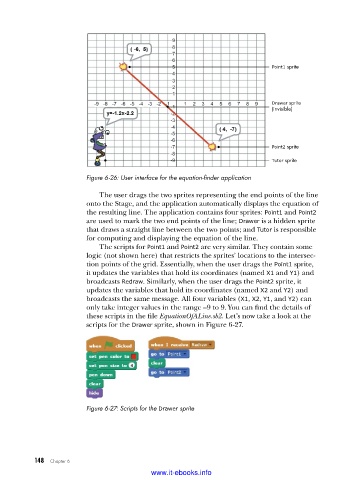
                         Figure 6-26: User interface for the equation-finder application

                             The user drags the two sprites representing the end points of the line
                         onto the Stage, and the application automatically displays the equation of
                         the resulting line. The application contains four sprites: Point1 and Point2
                         are used to mark the two end points of the line; Drawer is a hidden sprite
                         that draws a straight line between the two points; and Tutor is responsible
                         for computing and displaying the equation of the line.
                             The scripts for Point1 and Point2 are very similar. They contain some
                         logic (not shown here) that restricts the sprites’ locations to the intersec-
                         tion points of the grid. Essentially, when the user drags the Point1 sprite,
                         it updates the variables that hold its coordinates (named X1 and Y1) and
                         broadcasts Redraw. Similarly, when the user drags the Point2 sprite, it
                         updates the variables that hold its coordinates (named X2 and Y2) and
                         broadcasts the same message. All four variables (X1, X2, Y1, and Y2) can
                         only take integer values in the range –9 to 9. You can find the details of
                         these scripts in the file EquationOfALine.sb2. Let’s now take a look at the
                         scripts for the Drawer sprite, shown in Figure 6-27.


                         Figure 6-27: Scripts for the Drawer sprite


           148   Chapter 6
                                           www.it-ebooks.info

