


Page 179 - Learn To Program With Scratch
P. 179
The repeat until Block

                          Let’s say you are developing a game that presents the player with an
                            ele mentary math question. If the player’s answer is incorrect, the game
                          asks the same question again to give the player another chance. In other
                          words, the game asks the same question until the player enters the correct
                          answer. Clearly, the repeat block is inappropriate for this task because you
                          don’t know in advance how many times it will take the player to enter the
                          right answer; the first try might be a winner, or it may take 100 tries. The
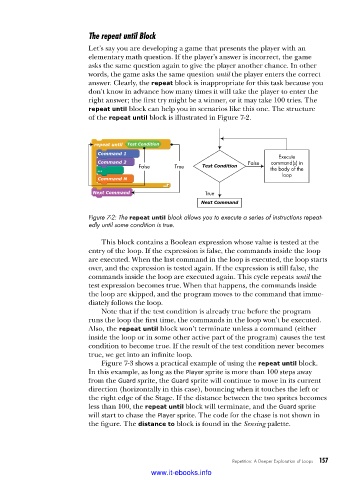
                          repeat until block can help you in scenarios like this one. The structure
                          of the repeat until block is illustrated in Figure 7-2.


                           repeat until  Test Condition
                            Command 1
                                                                              Execute
                            Command 2                    Test Condition  False  command(s) in
                            ...         False     True                      the body of the
                                                                               loop
                            Command N
                           Next Command                   True
                                                         Next Command
                          Figure 7-2: The repeat until block allows you to execute a series of instructions repeat-
                          edly until some condition is true .

                             This block contains a Boolean expression whose value is tested at the
                          entry of the loop. If the expression is false, the commands inside the loop
                          are executed. When the last command in the loop is executed, the loop starts
                          over, and the expression is tested again. If the expression is still false, the
                          commands inside the loop are executed again. This cycle repeats until the
                          test expression becomes true. When that happens, the commands inside
                          the loop are skipped, and the program moves to the command that imme-
                          diately follows the loop.
                             Note that if the test condition is already true before the program
                          runs the loop the first time, the commands in the loop won’t be executed.
                          Also, the repeat until block won’t terminate unless a command (either
                          inside the loop or in some other active part of the program) causes the test
                          condition to become true. If the result of the test condition never becomes
                          true, we get into an infinite loop.
                             Figure 7-3 shows a practical example of using the repeat until block.
                          In this example, as long as the Player sprite is more than 100 steps away
                          from the Guard sprite, the Guard sprite will continue to move in its current
                          direction (horizontally in this case), bouncing when it touches the left or
                          the right edge of the Stage. If the distance between the two sprites becomes
                          less than 100, the repeat until block will terminate, and the Guard sprite
                          will start to chase the Player sprite. The code for the chase is not shown in
                          the figure. The distance to block is found in the Sensing palette.


                                                                  Repetition: A Deeper Exploration of Loops   157

                                           www.it-ebooks.info

