


Page 183 - Learn To Program With Scratch
P. 183
The two balls in this figure move around the Stage and chase the
                          witch. The player moves the witch sprite with the keyboard and tries to
                          avoid being touched by the two balls. If the red ball touches the player at
                          any time, the game ends. If the green ball touches the player, it will stop
                          chasing the player, but the red ball will start to move a little faster—which
                          makes escaping it a real challenge.
                             The scripts for moving the witch sprite are similar to those of Fig-
                          ure 7-5, so I won’t show them here. The scripts for the two balls are shown
                          in Figure 7-8—let’s take a look at those.


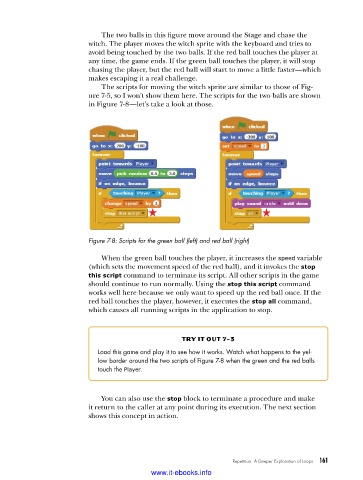
                          Figure 7-8: Scripts for the green ball (left) and red ball (right)

                             When the green ball touches the player, it increases the speed variable
                          (which sets the movement speed of the red ball), and it invokes the stop
                          this script command to terminate its script. All other scripts in the game
                          should continue to run normally. Using the stop this script command
                          works well here because we only want to speed up the red ball once. If the
                          red ball touches the player, however, it executes the stop all command,
                          which causes all running scripts in the application to stop.


                                                    try it out 7-3
                            Load this game and play it to see how it works . Watch what happens to the yel-
                            low border around the two scripts of Figure 7-8 when the green and the red balls
                            touch the Player .


                             You can also use the stop block to terminate a procedure and make
                          it return to the caller at any point during its execution. The next section
                          shows this concept in action.


                                                                  Repetition: A Deeper Exploration of Loops   161

                                           www.it-ebooks.info

