


Page 181 - Learn To Program With Scratch
P. 181
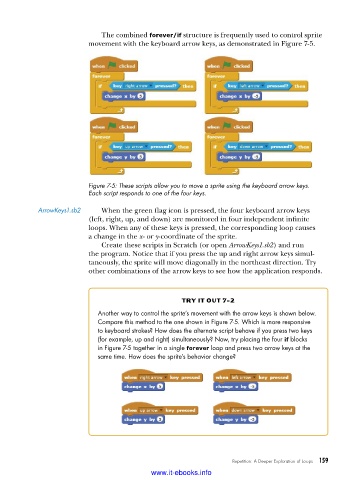
The combined forever/if structure is frequently used to control sprite
                          movement with the keyboard arrow keys, as demonstrated in Figure 7-5.


                          Figure 7-5: These scripts allow you to move a sprite using the keyboard arrow keys .
                          Each script responds to one of the four keys .

            ArrowKeys1 .sb2   When the green flag icon is pressed, the four keyboard arrow keys
                          (left, right, up, and down) are monitored in four independent infinite
                          loops. When any of these keys is pressed, the corresponding loop causes
                          a change in the x- or y-coordinate of the sprite.
                             Create these scripts in Scratch (or open ArrowKeys1.sb2) and run
                          the program. Notice that if you press the up and right arrow keys simul-
                          taneously, the sprite will move diagonally in the northeast direction. Try
                          other combinations of the arrow keys to see how the application responds.


                                                    try it out 7-2

                            Another way to control the sprite’s movement with the arrow keys is shown below .
                            Compare this method to the one shown in Figure 7-5 . Which is more responsive
                            to keyboard strokes? How does the alternate script behave if you press two keys
                            (for example, up and right) simultaneously? Now, try placing the four if blocks
                            in Figure 7-5 together in a single forever loop and press two arrow keys at the
                            same time . How does the sprite’s behavior change?


                                                                  Repetition: A Deeper Exploration of Loops   159

                                           www.it-ebooks.info

