


Page 182 - Learn To Program With Scratch
P. 182
Stop commands
                         Let’s say you’re writing a program to find the first integer less than 1,000
                         that is evenly divisible by 3, 5, and 7. You can write a script that checks
                         the numbers 999, 998, 997, and so on, one by one, in a loop. You want to
                         stop the search when you find the number you’re looking for (945 in this
                         example).
                             How can you tell Scratch to end the loop and stop the script? You can
                         use the stop command (from the Control palette) to end active scripts. The
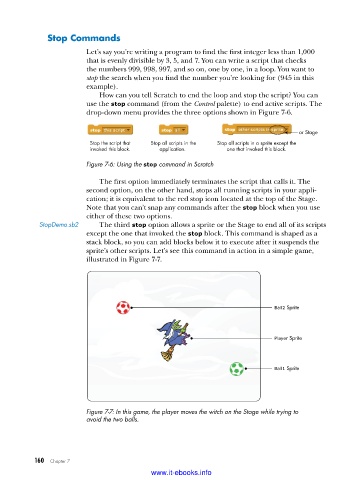
                         drop-down menu provides the three options shown in Figure 7-6.

                                                                                    or Stage
                          Stop the script that  Stop all scripts in the  Stop all scripts in a sprite except the
                          invoked this block.  application.     one that invoked this block.

                         Figure 7-6: Using the stop command in Scratch

                             The first option immediately terminates the script that calls it. The
                         second option, on the other hand, stops all running scripts in your appli-
                         cation; it is equivalent to the red stop icon located at the top of the Stage.
                         Note that you can’t snap any commands after the stop block when you use
                         either of these two options.
            StopDemo .sb2    The third stop option allows a sprite or the Stage to end all of its scripts
                         except the one that invoked the stop block. This command is shaped as a
                         stack block, so you can add blocks below it to execute after it suspends the
                         sprite’s other scripts. Let’s see this command in action in a simple game,
                         illustrated in Figure 7-7.


                                                                             Ball2 Sprite


                                                                             Player Sprite


                                                                             Ball1 Sprite


                         Figure 7-7: In this game, the player moves the witch on the Stage while trying to
                         avoid the two balls .


           160   Chapter 7
                                           www.it-ebooks.info

