


Page 180 - Learn To Program With Scratch
P. 180
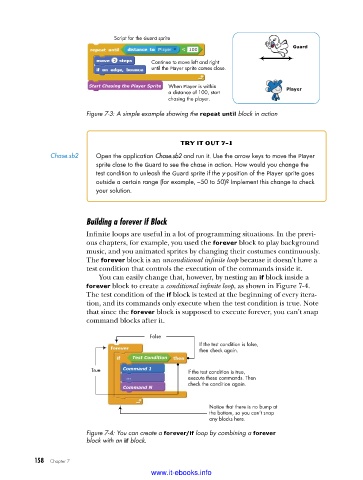
Script for the Guard sprite
                                                                                  Guard
                                           Continue to move left and right
                                           until the Player sprite comes close.

                          Start Chasing the Player Sprite  When Player is within
                                                a distance of 100, start         Player
                                                chasing the player.

                         Figure 7-3: A simple example showing the repeat until block in action


                                                   try it out 7-1
               Chase .sb2   Open the application Chase.sb2 and run it . Use the arrow keys to move the Player
                            sprite close to the Guard to see the chase in action . How would you change the
                            test condition to unleash the Guard sprite if the y-position of the Player sprite goes
                            outside a certain range (for example, –50 to 50)? Implement this change to check
                            your solution .


                         Building a forever if Block
                         Infinite loops are useful in a lot of programming situations. In the previ-
                         ous chapters, for example, you used the forever block to play background
                         music, and you animated sprites by changing their costumes continuously.
                         The forever block is an unconditional infinite loop because it doesn’t have a
                         test condition that controls the execution of the commands inside it.
                             You can easily change that, however, by nesting an if block inside a
                           forever block to create a conditional infinite loop, as shown in Figure 7-4.
                         The test condition of the if block is tested at the beginning of every itera-
                         tion, and its commands only execute when the test condition is true. Note
                         that since the forever block is supposed to execute forever, you can’t snap
                         command blocks after it.

                                           False
                                                        If the test condition is false,
                                                        then check again.
                                      Test Condition
                          True     Command 1         If the test condition is true,
                                    ...              execute these commands. Then
                                                     check the condition again.
                                   Command N

                                                           Notice that there is no bump at
                                                           the bottom, so you can’t snap
                                                           any blocks here.
                         Figure 7-4: You can create a forever/if loop by combining a forever
                         block with an if block .


           158   Chapter 7
                                           www.it-ebooks.info

