


Page 185 - Learn To Program With Scratch
P. 185
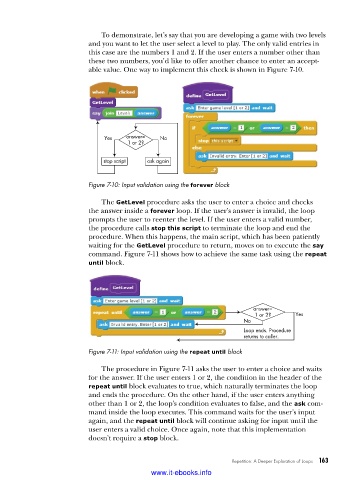
To demonstrate, let’s say that you are developing a game with two levels
                          and you want to let the user select a level to play. The only valid entries in
                          this case are the numbers 1 and 2. If the user enters a number other than
                          these two numbers, you’d like to offer another chance to enter an accept-
                          able value. One way to implement this check is shown in Figure 7-10.


                              Yes   answer=  No
                                    1 or 2?

                              stop script  ask again


                          Figure 7-10: Input validation using the forever block

                             The GetLevel procedure asks the user to enter a choice and checks
                          the answer inside a forever loop. If the user’s answer is invalid, the loop
                          prompts the user to reenter the level. If the user enters a valid number,
                          the procedure calls stop this script to terminate the loop and end the
                          procedure. When this happens, the main script, which has been patiently
                          waiting for the GetLevel procedure to return, moves on to execute the say
                          command. Figure 7-11 shows how to achieve the same task using the repeat
                          until block.


                                                                       answer=
                                                                        1 or 2?    Yes
                                                                     No
                                                                     Loop ends. Procedure
                                                                     returns to caller.
                          Figure 7-11: Input validation using the repeat until block

                             The procedure in Figure 7-11 asks the user to enter a choice and waits
                          for the answer. If the user enters 1 or 2, the condition in the header of the
                          repeat until block evaluates to true, which naturally terminates the loop
                          and ends the procedure. On the other hand, if the user enters anything
                          other than 1 or 2, the loop’s condition evaluates to false, and the ask com-
                          mand inside the loop executes. This command waits for the user’s input
                          again, and the repeat until block will continue asking for input until the
                          user enters a valid choice. Once again, note that this implementation
                          doesn’t require a stop block.


                                                                  Repetition: A Deeper Exploration of Loops   163

                                           www.it-ebooks.info

