


Page 198 - Learn To Program With Scratch
P. 198
When the green flag is clicked,
this script initializes the variables
Fired (the number of bullets fired)
and Hits (how many birds have been
hit) to 0. It then points the Bullet
sprite up and hides it. After that,
it enters an infinite loop to repeat-
edly check the status of the space-
bar key. When spacebar is pressed,
the script increments Fired by 1 and
creates a clone of the Bullet sprite
to move the bullet upward, as we’ll
see next. The script then waits some
time to prevent the player from fir-
ing another bullet too soon. Now
we’re ready to study the script of the
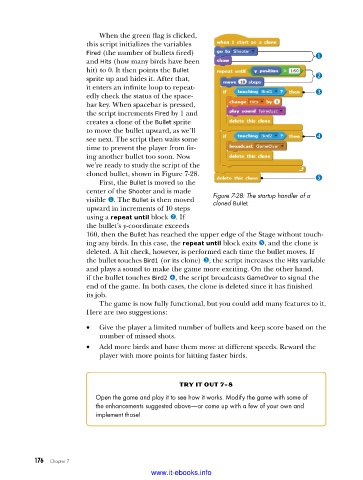
cloned bullet, shown in Figure 7-28.
First, the Bullet is moved to the
center of the Shooter and is made Figure 7-28: The startup handler of a
visible u. The Bullet is then moved cloned Bullet
upward in increments of 10 steps
using a repeat until block v. If
the bullet’s y-coordinate exceeds
160, then the Bullet has reached the upper edge of the Stage without touch-
ing any birds. In this case, the repeat until block exits y, and the clone is
deleted. A hit check, however, is performed each time the bullet moves. If
the bullet touches Bird1 (or its clone) w, the script increases the Hits variable
and plays a sound to make the game more exciting. On the other hand,
if the bullet touches Bird2 x, the script broadcasts GameOver to signal the
end of the game. In both cases, the clone is deleted since it has finished
its job.
The game is now fully functional, but you could add many features to it.
Here are two suggestions:
• Give the player a limited number of bullets and keep score based on the
number of missed shots.
• Add more birds and have them move at different speeds. Reward the
player with more points for hitting faster birds.
try it out 7-8
Open the game and play it to see how it works . Modify the game with some of
the enhancements suggested above—or come up with a few of your own and
implement those!
176 Chapter 7
www.it-ebooks.info

