


Page 217 - Learn To Program With Scratch
P. 217
The script selects a word randomly from a list and saves that word
                          in inWord u. It then sets strIn equal to inWord v and calls Randomize to
                          shuffle the characters of strIn w. After that, the script starts a loop to get
                          the player’s answer x. Inside the loop, the script asks the player to enter the
                          unscrambled word y and uses an if/else block to check that answer z. This
                          part is identical to what we did in the Fix My Spelling game in the previous
                          section.
                             The previous examples were just a small set of the different operations
                          you can do on strings. Try using the same techniques to change strings in
                          your own projects!
                             In the rest of this chapter, we’ll explore some programs that use strings
                          to solve interesting problems.


               Scratch Projects

                          The procedures you just saw demonstrated the basics of processing strings.
                          In this section, we’ll apply what we’ve learned to write several practical appli-
                          cations. Along the way, you’ll learn some new programming tricks that you
                          can use in your own creations.

                          Shoot

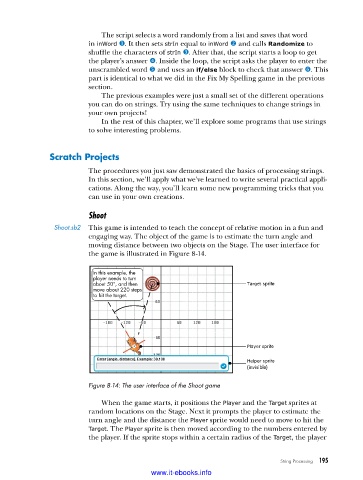
                Shoot .sb2  This game is intended to teach the concept of relative motion in a fun and
                          engaging way. The object of the game is to estimate the turn angle and
                          moving distance between two objects on the Stage. The user interface for
                          the game is illustrated in Figure 8-14.


                           In this example, the
                           player needs to turn
                           about 50°, and then                        Target sprite
                           move about 220 steps
                           to hit the target.


                                                                      Player sprite

                                                                        Helper sprite
                                                                      (invisible)

                          Figure 8-14: The user interface of the Shoot game

                             When the game starts, it positions the Player and the Target sprites at
                          random locations on the Stage. Next it prompts the player to estimate the
                          turn angle and the distance the Player sprite would need to move to hit the
                          Target. The Player sprite is then moved according to the numbers entered by
                          the player. If the sprite stops within a certain radius of the Target, the player


                                                                               String Processing   195

                                           www.it-ebooks.info

