


Page 222 - Learn To Program With Scratch
P. 222
bit. When the user enters the binary number to be converted, the Bit sprite
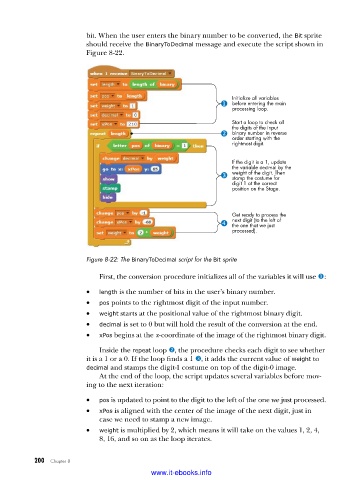
should receive the BinaryToDecimal message and execute the script shown in
Figure 8-22.
Initialize all variables
before entering the main
processing loop.
Start a loop to check all
the digits of the input
binary number in reverse
order starting with the
rightmost digit.
If the digit is a 1, update
the variable decimal by the
weight of the digit. Then
stamp the costume for
digit 1 at the correct
position on the Stage.
Get ready to process the
next digit (to the left of
the one that we just
processed).
Figure 8-22: The BinaryToDecimal script for the Bit sprite
First, the conversion procedure initializes all of the variables it will use u:
• length is the number of bits in the user’s binary number.
• pos points to the rightmost digit of the input number.
• weight starts at the positional value of the rightmost binary digit.
• decimal is set to 0 but will hold the result of the conversion at the end.
• xPos begins at the x-coordinate of the image of the rightmost binary digit.
Inside the repeat loop v, the procedure checks each digit to see whether
it is a 1 or a 0. If the loop finds a 1 w, it adds the current value of weight to
decimal and stamps the digit-1 costume on top of the digit-0 image.
At the end of the loop, the script updates several variables before mov-
ing to the next iteration:
• pos is updated to point to the digit to the left of the one we just processed.
• xPos is aligned with the center of the image of the next digit, just in
case we need to stamp a new image.
• weight is multiplied by 2, which means it will take on the values 1, 2, 4,
8, 16, and so on as the loop iterates.
200 Chapter 8
www.it-ebooks.info

