


Page 220 - Learn To Program With Scratch
P. 220
Binary to Decimal Converter

          BinaryToDecimal   Binary (base-2) numbers have only two possible digits: 0 and 1. Most com-
                     .sb2  puters operate and communicate with binary numbers. Humans, however,
                         prefer to work with numbers in the decimal (base-10) system. In this sec-
                         tion, you’ll develop an application that converts binary numbers to their
                         decimal equivalents. Later, you could use it as a game to test your ability
                         to perform such conversions.
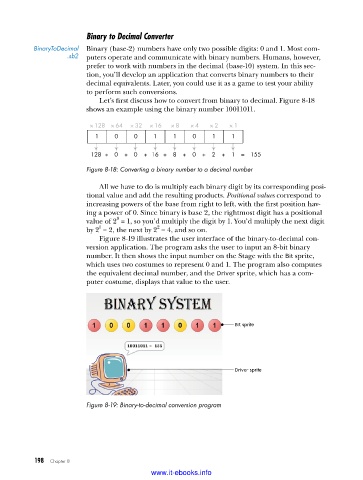
                             Let’s first discuss how to convert from binary to decimal. Figure 8-18
                         shows an example using the binary number 10011011.

                          × 128 × 64  × 32  × 16  × 8  × 4  × 2  × 1
                           1     0    0     1    1     0    1    1

                          128 +  0  +  0  +  16 +  8  +  0  +  2  +  1  =  155

                         Figure 8-18: Converting a binary number to a decimal number

                             All we have to do is multiply each binary digit by its corresponding posi-
                         tional value and add the resulting products. Positional values correspond to
                         increasing powers of the base from right to left, with the first position hav-
                         ing a power of 0. Since binary is base 2, the rightmost digit has a positional
                                 0
                         value of 2  = 1, so you’d multiply the digit by 1. You’d multiply the next digit
                                             2
                            1
                         by 2  = 2, the next by 2  = 4, and so on.
                             Figure 8-19 illustrates the user interface of the binary-to-decimal con-
                         version application. The program asks the user to input an 8-bit binary
                         number. It then shows the input number on the Stage with the Bit sprite,
                         which uses two  costumes to represent 0 and 1. The program also computes
                         the equivalent decimal number, and the Driver sprite, which has a com-
                         puter costume, displays that value to the user.


                                                                  Bit sprite


                                                                  Driver sprite


                         Figure 8-19: Binary-to-decimal conversion program


           198   Chapter 8
                                           www.it-ebooks.info

