


Page 221 - Learn To Program With Scratch
P. 221
try it out 8-5
                            To check your understanding, practice the following binary-to-decimal conver-
                            sions: (a) 1010100, (b) 1101001, and (c) 1100001 .


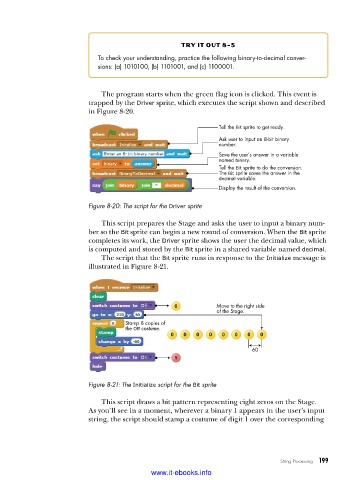
                             The program starts when the green flag icon is clicked. This event is
                          trapped by the Driver sprite, which executes the script shown and described
                          in Figure 8-20.
                                                              Tell the Bit sprite to get ready.

                                                              Ask user to input an 8-bit binary
                                                              number.
                                                              Save the user’s answer in a variable
                                                              named binary.
                                                              Tell the Bit sprite to do the conversion.
                                                              The Bit sprite saves the answer in the
                                                              decimal variable.
                                                              Display the result of the conversion.

                          Figure 8-20: The script for the Driver sprite

                             This script prepares the Stage and asks the user to input a binary num-
                          ber so the Bit sprite can begin a new round of conversion. When the Bit sprite
                          completes its work, the Driver sprite shows the user the decimal value, which
                          is computed and stored by the Bit sprite in a shared variable named decimal.
                             The script that the Bit sprite runs in response to the Initialize message is
                          illustrated in Figure 8-21.


                                                             Move to the right side
                                                             of the Stage.
                                    Stamp 8 copies of
                                    the Off costume.


                                                                       60


                          Figure 8-21: The Initialize script for the Bit sprite

                             This script draws a bit pattern representing eight zeros on the Stage.
                          As you’ll see in a moment, wherever a binary 1 appears in the user’s input
                          string, the script should stamp a costume of digit 1 over the corresponding


                                                                               String Processing   199

                                           www.it-ebooks.info

