


Page 224 - Learn To Program With Scratch
P. 224
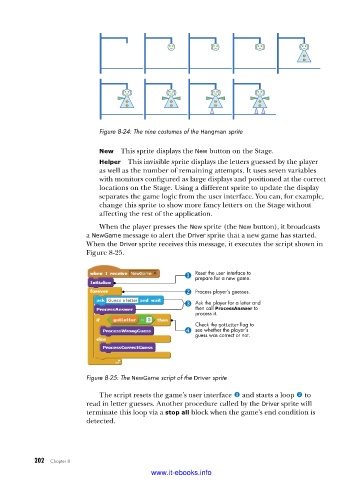
Figure 8-24: The nine costumes of the Hangman sprite
New This sprite displays the New button on the Stage.
Helper This invisible sprite displays the letters guessed by the player
as well as the number of remaining attempts. It uses seven variables
with monitors configured as large displays and positioned at the correct
locations on the Stage. Using a different sprite to update the display
separates the game logic from the user interface. You can, for example,
change this sprite to show more fancy letters on the Stage without
affecting the rest of the application.
When the player presses the New sprite (the New button), it broadcasts
a NewGame message to alert the Driver sprite that a new game has started.
When the Driver sprite receives this message, it executes the script shown in
Figure 8-25.
Reset the user interface to
prepare for a new game.
Process player’s guesses.
Ask the player for a letter and
then call ProcessAnswer to
process it.
Check the gotLetter flag to
see whether the player’s
guess was correct or not.
Figure 8-25: The NewGame script of the Driver sprite
The script resets the game’s user interface u and starts a loop v to
read in letter guesses. Another procedure called by the Driver sprite will
terminate this loop via a stop all block when the game’s end condition is
detected.
202 Chapter 8
www.it-ebooks.info

