


Page 229 - Learn To Program With Scratch
P. 229
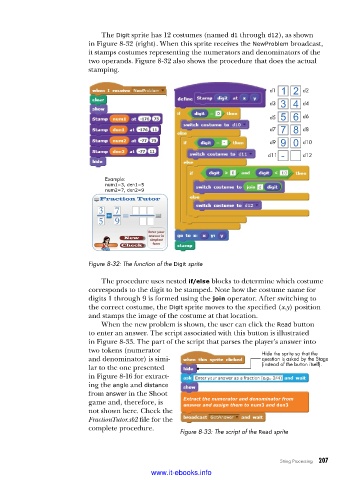
The Digit sprite has 12 costumes (named d1 through d12), as shown
                          in Figure 8-32 (right). When this sprite receives the NewProblem broadcast,
                          it stamps costumes representing the numerators and denominators of the
                          two operands. Figure 8-32 also shows the procedure that does the actual
                          stamping.


                                                                            d1       d2
                                                                            d3       d4

                                                                            d5       d6
                                                                            d7       d8
                                                                            d9       d10
                                                                           d11       d12


                              Example:
                              num1=3, den1=5
                              num2=7, den2=9


                          Figure 8-32: The function of the Digit sprite

                             The procedure uses nested if/else blocks to determine which costume
                          corresponds to the digit to be stamped. Note how the costume name for
                          digits 1 through 9 is formed using the join operator. After switching to
                          the correct costume, the Digit sprite moves to the specified (x,y) position
                          and stamps the image of the costume at that location.
                             When the new problem is shown, the user can click the Read button
                          to enter an answer. The script associated with this button is illustrated
                          in Figure 8-33. The part of the script that parses the player’s answer into
                          two tokens (numerator                           Hide the sprite so that the
                          and denominator) is simi-                       question is asked by the Stage
                          lar to the one presented                        (instead of the button itself).
                          in Figure 8-16 for extract-
                          ing the angle and distance
                          from answer in the Shoot
                          game and, therefore, is   Extract the numerator and denominator from

                                                    answer and assign them to num3 and den3
                          not shown here. Check the
                          FractionTutor.sb2 file for the
                          complete procedure.
                                                   Figure 8-33: The script of the Read sprite


                                                                               String Processing   207

                                           www.it-ebooks.info

