


Page 231 - Learn To Program With Scratch
P. 231
a +  c  = ad + cb                            a ×  c  =  ac
                                   b  d    bd                                   b d   bd


                                    a  −  c  =  ad cb                           a  c  ad
                                             −
                                    b  d    bd                                  b  ÷  d  =  bc


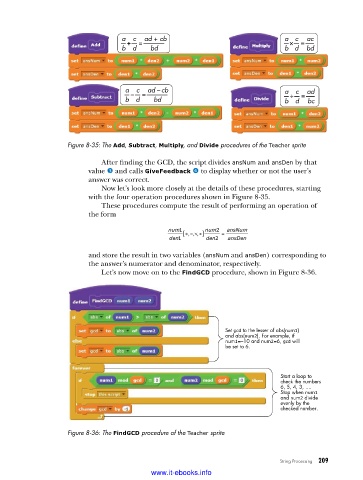
                    Figure 8-35: The Add, Subtract, Multiply, and Divide procedures of the Teacher sprite

                             After finding the GCD, the script divides ansNum and ansDen by that
                          value w and calls GiveFeedback x to display whether or not the user’s
                          answer was correct.
                             Now let’s look more closely at the details of these procedures, starting
                          with the four operation procedures shown in Figure 8-35.
                             These procedures compute the result of performing an operation of
                          the form

                                                num1 [  +−  num2  =  ansNum
                                                     ,, ,×÷]
                                                den1      den2  ansDen

                          and store the result in two variables (ansNum and ansDen) corresponding to
                          the answer’s numerator and denominator, respectively.
                             Let’s now move on to the FindGCD procedure, shown in Figure 8-36.


                                                                Set gcd to the lesser of abs(num1)
                                                                and abs(num2). For example, if
                                                                num1=–10 and num2=6, gcd will
                                                                be set to 6.


                                                                               Start a loop to
                                                                               check the numbers
                                                                               6, 5, 4, 3, ....
                                                                               Stop when num1
                                                                               and num2 divide
                                                                               evenly by the
                                                                               checked number.

                    Figure 8-36: The FindGCD procedure of the Teacher sprite


                                                                               String Processing   209

                                           www.it-ebooks.info

