


Page 236 - Learn To Program With Scratch
P. 236
entered by a user. We’ll then discuss numeric lists and common operations
                         performed on them, such as finding the minimum, the maximum, and the
                         average value of their elements. After that, we’ll learn one algorithm for
                         sorting the elements in a list. We’ll end with several example programs that
                         demonstrate some real-world applications of lists.


              Lists in Scratch
                         A list is like a container where you can store and access multiple values. You
                         can think of it as a dresser with many drawers, with each drawer storing a
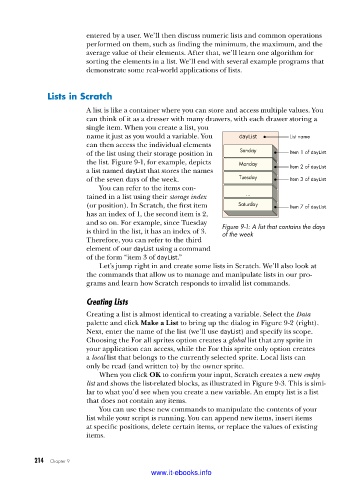
                         single item. When you create a list, you
                         name it just as you would a variable. You   dayList      List name
                         can then access the individual elements
                         of the list using their storage position in   Sunday     Item 1 of dayList
                         the list. Figure 9-1, for example, depicts   Monday
                         a list named dayList that stores the names               Item 2 of dayList
                         of the seven days of the week.            Tuesday        Item 3 of dayList
                             You can refer to the items con-
                         tained in a list using their storage index   ...
                         (or position). In Scratch, the first item   Saturday     Item 7 of dayList
                         has an index of 1, the second item is 2,
                         and so on. For example, since Tuesday   Figure 9-1: A list that contains the days
                         is third in the list, it has an index of 3.   of the week
                         Therefore, you can refer to the third
                           element of our dayList using a command
                         of the form “item 3 of dayList.”
                             Let’s jump right in and create some lists in Scratch. We’ll also look at
                         the commands that allow us to manage and manipulate lists in our pro-
                         grams and learn how Scratch responds to invalid list commands.

                         Creating Lists

                         Creating a list is almost identical to creating a variable. Select the Data
                         palette and click Make a List to bring up the dialog in Figure 9-2 (right).
                         Next, enter the name of the list (we’ll use dayList) and specify its scope.
                         Choosing the For all sprites option creates a global list that any sprite in
                         your application can access, while the For this sprite only option creates
                         a local list that belongs to the currently selected sprite. Local lists can
                         only be read (and written to) by the owner sprite.
                             When you click OK to confirm your input, Scratch creates a new empty
                         list and shows the list-related blocks, as illustrated in Figure 9-3. This is simi-
                         lar to what you’d see when you create a new variable. An empty list is a list
                         that does not contain any items.
                             You can use these new commands to manipulate the contents of your
                         list while your script is running. You can append new items, insert items
                         at specific positions, delete certain items, or replace the values of existing
                         items.


           214   Chapter 9
                                           www.it-ebooks.info

