


Page 237 - Learn To Program With Scratch
P. 237
Name

                                                                                    Scope


                                        Select the Data
                                       palette and click
                                         this button.

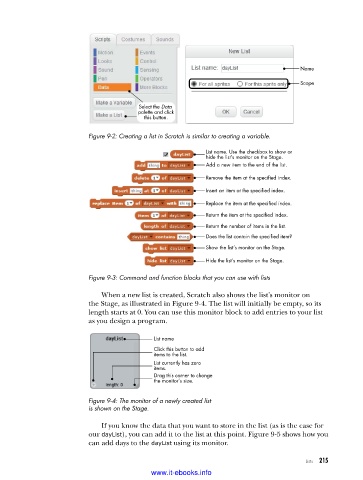
                          Figure 9-2: Creating a list in Scratch is similar to creating a variable .

                                                          List name. Use the checkbox to show or
                                                          hide the list’s monitor on the Stage.
                                                          Add a new item to the end of the list.
                                                          Remove the item at the specified index.
                                                          Insert an item at the specified index.

                                                          Replace the item at the specified index.
                                                          Return the item at the specified index.
                                                          Return the number of items in the list.
                                                          Does the list contain the specified item?
                                                          Show the list’s monitor on the Stage.

                                                          Hide the list’s monitor on the Stage.
                          Figure 9-3: Command and function blocks that you can use with lists

                             When a new list is created, Scratch also shows the list’s monitor on
                          the Stage, as illustrated in Figure 9-4. The list will initially be empty, so its
                          length starts at 0. You can use this monitor block to add entries to your list
                          as you design a program.

                                            List name
                                            Click this button to add
                                            items to the list.
                                            List currently has zero
                                            items.
                                            Drag this corner to change
                                            the monitor’s size.


                          Figure 9-4: The monitor of a newly created list
                          is shown on the Stage .

                             If you know the data that you want to store in the list (as is the case for
                          our dayList), you can add it to the list at this point. Figure 9-5 shows how you
                          can add days to the dayList using its monitor.

                                                                                      Lists   215

                                           www.it-ebooks.info

