


Page 24 - Learn To Program With Scratch
P. 24
what is Scratch?
                         A computer program is just a set of instructions that tell a computer what
                         to do. You write these instructions using a programming language, and that’s
                         where Scratch comes in.
                             Most programming languages are text based, which means you have to
                         give the computer commands in what looks like a cryptic form of English.
                         For example, to display “Hello!” on the screen, you might write:

                             print('Hello!')                  (in the Python language)
                             std::cout << "Hello!" << std::endl;  (in the C++ language)
                             System.out.print("Hello!");      (in the Java language)

                             Learning these languages and understanding their syntax rules can
                         be challenging for beginners. Scratch, on the other hand, is a visual pro-
                         gramming language. It was developed in the Massachusetts Institute of
                         Technology (MIT) Media Lab to make programming easier and more fun
                         to learn.
                             In Scratch, you won’t type any complicated commands. Instead, you’ll
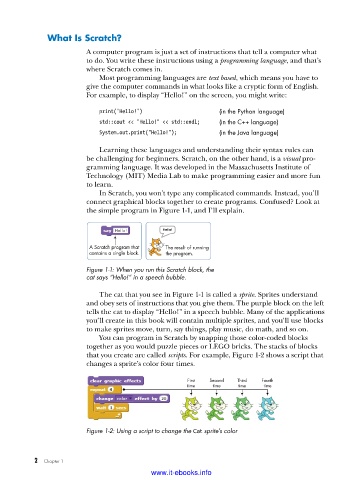
                         connect graphical blocks together to create programs. Confused? Look at
                         the simple program in Figure 1-1, and I’ll explain.


                          A Scratch program that  The result of running
                          contains a single block.   the program.

                         Figure 1-1: When you run this Scratch block, the
                         cat says “Hello!” in a speech bubble .

                             The cat that you see in Figure 1-1 is called a sprite. Sprites understand
                         and obey sets of instructions that you give them. The purple block on the left
                         tells the cat to display “Hello!” in a speech bubble. Many of the applications
                         you’ll create in this book will contain multiple sprites, and you’ll use blocks
                         to make sprites move, turn, say things, play music, do math, and so on.
                             You can program in Scratch by snapping those color-coded blocks
                         together as you would puzzle pieces or LEGO bricks. The stacks of blocks
                         that you create are called scripts. For example, Figure 1-2 shows a script that
                         changes a sprite’s color four times.


                                                     First  Second  Third  Fourth
                                                     time   time   time   time


                         Figure 1-2: Using a script to change the Cat sprite’s color


           2   Chapter 1
                                           www.it-ebooks.info

