


Page 257 - Learn To Program With Scratch
P. 257
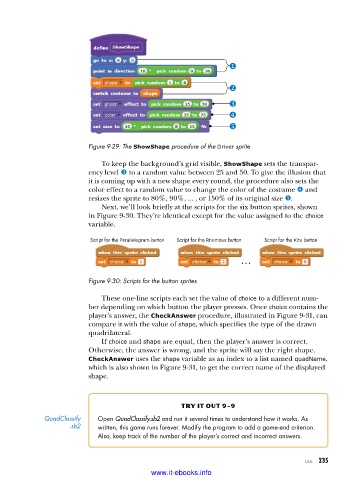
Figure 9-29: The ShowShape procedure of the Driver sprite
To keep the background’s grid visible, ShowShape sets the transpar-
ency level w to a random value between 25 and 50. To give the illusion that
it is coming up with a new shape every round, the procedure also sets the
color effect to a random value to change the color of the costume x and
resizes the sprite to 80%, 90%, ... , or 150% of its original size y.
Next, we’ll look briefly at the scripts for the six button sprites, shown
in Figure 9-30. They’re identical except for the value assigned to the choice
variable.
Script for the Parallelogram button Script for the Rhombus button Script for the Kite button
...
Figure 9-30: Scripts for the button sprites
These one-line scripts each set the value of choice to a different num-
ber depending on which button the player presses. Once choice contains the
player’s answer, the CheckAnswer procedure, illustrated in Figure 9-31, can
compare it with the value of shape, which specifies the type of the drawn
quadrilateral.
If choice and shape are equal, then the player’s answer is correct.
Otherwise, the answer is wrong, and the sprite will say the right shape.
CheckAnswer uses the shape variable as an index to a list named quadName,
which is also shown in Figure 9-31, to get the correct name of the displayed
shape.
try it out 9-9
QuadClassify Open QuadClassify.sb2 and run it several times to understand how it works . As
.sb2 written, this game runs forever . Modify the program to add a game-end criterion .
Also, keep track of the number of the player’s correct and incorrect answers .
Lists 235
www.it-ebooks.info

