


Page 261 - Learn To Program With Scratch
P. 261
NewGame starts by clearing the speech bubble from the previous puzzle
                          (if any) and initializing the clicked variable to 0 u. It then saves the number
                          of the randomly selected puzzle in a variable called puzzleNum v. After that,
                          it reads the starting position of the selected puzzle from the index list and
                          saves it in the pos variable w. The script then uses pos to read the answer
                          of that puzzle and saves it in puzzleAnswer x. Next, the script adds 1 to pos
                          so it points to the first puzzle instruction, and it starts a repeat until loop
                          to say the puzzle’s instructions in order y. After saying each instruction,
                          the script waits for the clicked variable to be set to 1 before moving to the
                          next instruction z. When the loop finds an empty element, it exits, and the
                          script says the puzzle’s answer {.


                                                   try it out 9-10

                            If you delete one of the puzzles or change the number of instructions for some
                            puzzles, then you would need to rebuild the index list to match up with the instr
                            list . Write a procedure that automatically populates the index list based on the
                              current contents of the instr list . The key is to search for the empty strings in the
                            instr list, as these indicate the end of one record and the start of the next record .


                          Flower Anatomy Quiz

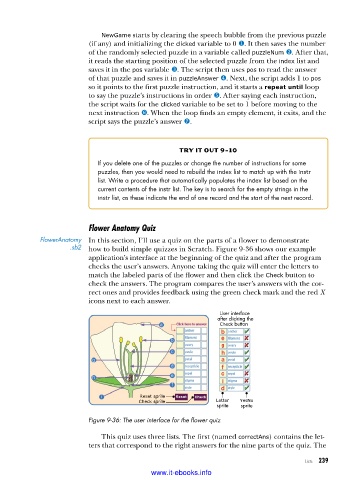
            FlowerAnatomy   In this section, I’ll use a quiz on the parts of a flower to demonstrate
                     .sb2  how to build simple quizzes in Scratch. Figure 9-36 shows our example
                          application’s interface at the beginning of the quiz and after the program
                          checks the user’s answers. Anyone taking the quiz will enter the letters to
                          match the labeled parts of the flower and then click the Check button to
                          check the answers. The program compares the user’s answers with the cor-
                          rect ones and provides feedback using the green check mark and the red X
                          icons next to each answer.
                                                              User interface
                                                              after clicking the
                                                              Check button


                                        Reset sprite
                                        Check sprite         Letter  YesNo
                                                             sprite  sprite
                          Figure 9-36: The user interface for the flower quiz

                             This quiz uses three lists. The first (named correctAns) contains the let-
                          ters that correspond to the right answers for the nine parts of the quiz. The

                                                                                      Lists   239

                                           www.it-ebooks.info

