


Page 260 - Learn To Program With Scratch
P. 260
2. Consult the index list for the starting position of the selected puzzle’s
record. For example, if the second puzzle is selected, the index list tells
us that the record of this puzzle starts at index 9 in the instr list.
3. Access the instr list at the index found in Step 2. The first element at
that index is interpreted as the answer of the puzzle. The following ele-
ments represent the instructions that the wizard will say.
4. Let the wizard say the puzzle instructions one by one until encounter-
ing the empty element, which signifies the last instruction. The wizard
should wait for the user to press the OK button before saying a new
instruction.
5. Reveal the answer of the puzzle.
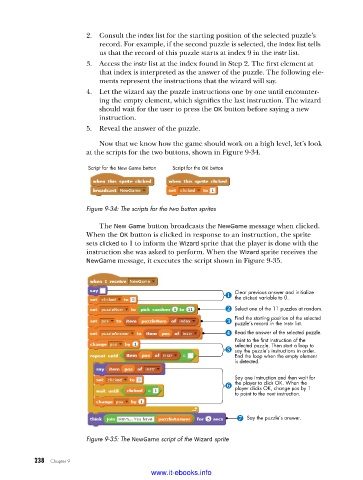
Now that we know how the game should work on a high level, let’s look
at the scripts for the two buttons, shown in Figure 9-34.
Script for the New Game button Script for the OK button
Figure 9-34: The scripts for the two button sprites
The New Game button broadcasts the NewGame message when clicked.
When the OK button is clicked in response to an instruction, the sprite
sets clicked to 1 to inform the Wizard sprite that the player is done with the
instruction she was asked to perform. When the Wizard sprite receives the
NewGame message, it executes the script shown in Figure 9-35.
Clear previous answer and initialize
the clicked variable to 0.
Select one of the 11 puzzles at random.
Find the starting position of the selected
puzzle’s record in the instr list.
Read the answer of the selected puzzle.
Point to the first instruction of the
selected puzzle. Then start a loop to
say the puzzle’s instructions in order.
End the loop when the empty element
is detected.
Say one instruction and then wait for
the player to click OK. When the
player clicks OK, change pos by 1
to point to the next instruction.
Say the puzzle’s answer.
Figure 9-35: The NewGame script of the Wizard sprite
238 Chapter 9
www.it-ebooks.info

