


Page 63 - Learn To Program With Scratch
P. 63
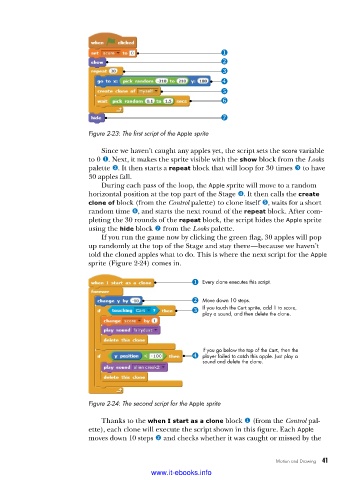
Figure 2-23: The first script of the Apple sprite
Since we haven’t caught any apples yet, the script sets the score variable
to 0 u. Next, it makes the sprite visible with the show block from the Looks
palette v. It then starts a repeat block that will loop for 30 times w to have
30 apples fall.
During each pass of the loop, the Apple sprite will move to a random
horizontal position at the top part of the Stage x. It then calls the create
clone of block (from the Control palette) to clone itself y, waits for a short
random time z, and starts the next round of the repeat block. After com-
pleting the 30 rounds of the repeat block, the script hides the Apple sprite
using the hide block { from the Looks palette.
If you run the game now by clicking the green flag, 30 apples will pop
up randomly at the top of the Stage and stay there—because we haven’t
told the cloned apples what to do. This is where the next script for the Apple
sprite (Figure 2-24) comes in.
Every clone executes this script.
Move down 10 steps.
If you touch the Cart sprite, add 1 to score,
play a sound, and then delete the clone.
If you go below the top of the Cart, then the
player failed to catch this apple. Just play a
sound and delete the clone.
Figure 2-24: The second script for the Apple sprite
Thanks to the when I start as a clone block u (from the Control pal-
ette), each clone will execute the script shown in this figure. Each Apple
moves down 10 steps v and checks whether it was caught or missed by the
Motion and Drawing 41
www.it-ebooks.info

