


Page 58 - Learn To Program With Scratch
P. 58
Scratch Projects
                         In this section, we’ll develop two short programs that should further
                         your understanding of the Motion and Pen blocks you’ve learned so
                         far. You can find the backdrops and sprites in the project files for this
                         chapter, so we’ll focus on writing the scripts we need to make these
                         applications work. An explanation of an additional bonus game, called
                         Survival Jump, is available in the extra resources. You’ll find details in
                         BonusApplications.pdf (http://nostarch.com/learnscratch/).
                             Some of these scripts will use command blocks that you haven’t seen,
                         but don’t worry if you don’t completely understand some things. You’ll
                         learn all about them in the coming chapters.

                         Get the Money
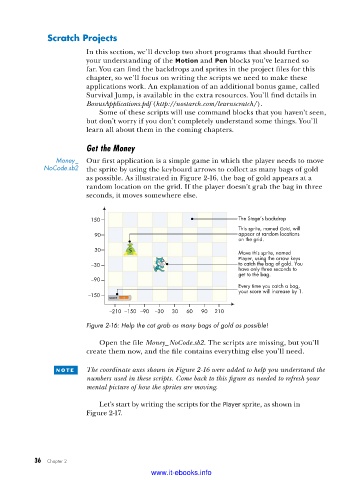
                 Money_  Our first application is a simple game in which the player needs to move
             NoCode .sb2  the sprite by using the keyboard arrows to collect as many bags of gold
                         as possible. As illustrated in Figure 2-16, the bag of gold appears at a
                         random location on the grid. If the player doesn’t grab the bag in three
                         seconds, it moves somewhere else.


                          150                                      The Stage’s backdrop
                                                                   This sprite, named Gold, will
                           90                                      appear at random locations
                                                                   on the grid.
                           30
                                                                   Move this sprite, named
                                                                   Player, using the arrow keys
                          –30                                      to catch the bag of gold. You
                                                                   have only three seconds to
                                                                   get to the bag.
                          –90
                                                                   Every time you catch a bag,
                                                                   your score will increase by 1.
                          –150
                               –210 –150  –90  –30  30  60  90  210

                         Figure 2-16: Help the cat grab as many bags of gold as possible!

                             Open the file Money_NoCode.sb2. The scripts are missing, but you’ll
                         create them now, and the file contains everything else you’ll need.

                 n o t e    The coordinate axes shown in Figure 2-16 were added to help you understand the
                         numbers used in these scripts. Come back to this figure as needed to refresh your
                         mental picture of how the sprites are moving.

                             Let’s start by writing the scripts for the Player sprite, as shown in
                         Figure 2-17.


           36   Chapter 2
                                           www.it-ebooks.info

