


Page 70 - Learn To Program With Scratch
P. 70
the Looks Palette
                         You can draw images directly on the Stage using the pen commands, but
                         costumes provide another powerful, and sometimes much easier, way to
                         add graphics to your programs. The commands in the Looks palette will let
                         you manipulate costumes to create animations, add thought bubbles, apply
                         graphic effects, and change a sprite’s visibility. We’ll explore those com-
                         mand blocks in this section.

                         Changing Costumes to Animate
            Animation .sb2  You know how to send a sprite from one point to another on the Stage, but
                         static sprites don’t look very lifelike as they jump around. If you use differ-
                         ent costumes and switch between them fast enough, you can make a sprite
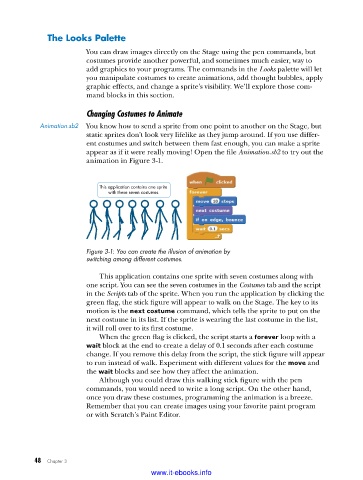
                         appear as if it were really moving! Open the file Animation.sb2 to try out the
                         animation in Figure 3-1.


                             This application contains one sprite
                               with these seven costumes.


                         Figure 3-1: You can create the illusion of animation by
                         switching among different costumes .

                             This application contains one sprite with seven costumes along with
                         one script. You can see the seven costumes in the Costumes tab and the script
                         in the Scripts tab of the sprite. When you run the application by clicking the
                         green flag, the stick figure will appear to walk on the Stage. The key to its
                         motion is the next costume command, which tells the sprite to put on the
                         next costume in its list. If the sprite is wearing the last costume in the list,
                         it will roll over to its first costume.
                             When the green flag is clicked, the script starts a forever loop with a
                         wait block at the end to create a delay of 0.1 seconds after each costume
                         change. If you remove this delay from the script, the stick figure will appear
                         to run instead of walk. Experiment with different values for the move and
                         the wait blocks and see how they affect the animation.
                             Although you could draw this walking stick figure with the pen
                         commands, you would need to write a long script. On the other hand,
                         once you draw these costumes, programming the animation is a breeze.
                         Remember that you can create images using your favorite paint program
                         or with Scratch’s Paint Editor.


           48   Chapter 3
                                           www.it-ebooks.info

