


Page 74 - Learn To Program With Scratch
P. 74
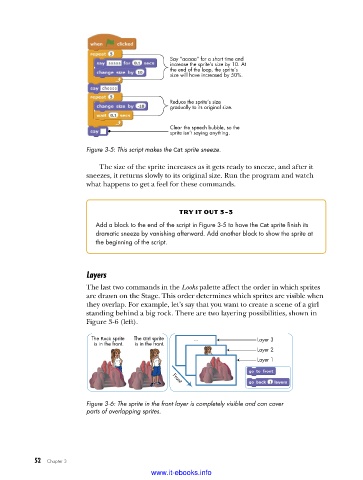
Say “aaaaa” for a short time and
                                                increase the sprite’s size by 10. At
                                                the end of the loop, the sprite’s
                                                size will have increased by 50%.


                                                Reduce the sprite’s size
                                                gradually to its original size.


                                                Clear the speech bubble, so the
                                                sprite isn’t saying anything.
                         Figure 3-5: This script makes the Cat sprite sneeze .

                             The size of the sprite increases as it gets ready to sneeze, and after it
                         sneezes, it returns slowly to its original size. Run the program and watch
                         what happens to get a feel for these commands.


                                                   try it out 3-3
                            Add a block to the end of the script in Figure 3-5 to have the Cat sprite finish its
                            dramatic sneeze by vanishing afterward . Add another block to show the sprite at
                            the beginning of the script .


                         Layers
                         The last two commands in the Looks palette affect the order in which sprites
                         are drawn on the Stage. This order determines which sprites are visible when
                         they overlap. For example, let’s say that you want to create a scene of a girl
                         standing behind a big rock. There are two layering possibilities, shown in
                         Figure 3-6 (left).

                          The Rock sprite   The Girl sprite   ...       Layer 3
                           is in the front.  is in the front.
                                                                        Layer 2
                                                                        Layer 1


                                                 Front

                         Figure 3-6: The sprite in the front layer is completely visible and can cover
                         parts of overlapping sprites .


           52   Chapter 3
                                           www.it-ebooks.info

