


Page 42 - Super Scratch Programming Adventure -1st Edition
P. 42
❸
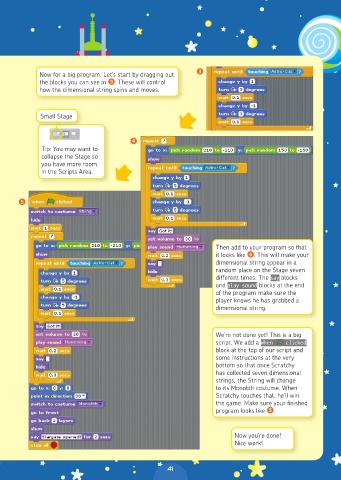
            Now for a big program. Let’s start by dragging out
            the blocks you can see in ❸. These will control
            how the dimensional string spins and moves.


             Small Stage


                                      ❹
             Tip: You may want to
             collapse the Stage so
             you have more room
             in the Scripts Area.


      ❺


                                                               Then add to your program so that
                                                               it looks like ❹. This will make your
                                                               dimensional string appear in a
                                                               random place on the Stage seven
                                                               different times. The say blocks
                                                               and play sound blocks at the end
                                                               of the program make sure the
                                                               player knows he has grabbed a
                                                               dimensional string.


                                                               We’re not done yet! This is a big
                                                               script. We add a When    clicked
                                                               block at the top of our script and
                                                               some instructions at the very
                                                               bottom so that once Scratchy
                                                               has collected seven dimensional
                                                               strings, the String will change
                                                               to its Monolith costume. When
                                                               Scratchy touches that, he’ll win
                                                               the game. Make sure your finished
                                                               program looks like ❺.


                                                                    Now you’re done!
                                                                    Nice work!


                                                 41

