


Page 37 - Super Scratch Programming Adventure -1st Edition
P. 37
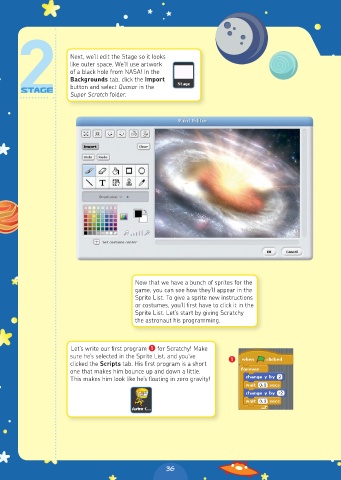
Next, we’ll edit the Stage so it looks
                     like outer space. We’ll use artwork
                     of a black hole from NASA! In the
                     Backgrounds tab, click the Import
                     button and select Quasar in the
                     Super Scratch folder.


                                        Now that we have a bunch of sprites for the
                                        game, you can see how they’ll appear in the
                                        Sprite List. To give a sprite new instructions
                                        or costumes, you’ll first have to click it in the
                                        Sprite List. Let’s start by giving Scratchy
                                        the astronaut his programming.


                     Let’s write our first program ❶ for Scratchy! Make
                     sure he’s selected in the Sprite List, and you’ve   ❶
                     clicked the Scripts tab. His first program is a short
                     one that makes him bounce up and down a little.
                     This makes him look like he’s floating in zero gravity!


                                                36

