


Page 40 - Super Scratch Programming Adventure -1st Edition
P. 40
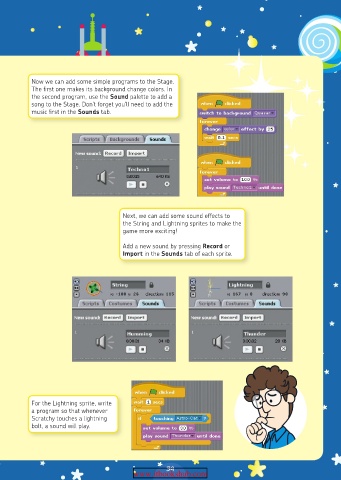
Now we can add some simple programs to the Stage.
          The first one makes its background change colors. In
          the second program, use the Sound palette to add a
          song to the Stage. Don’t forget you’ll need to add the
          music first in the Sounds tab.


                                    Next, we can add some sound effects to
                                    the String and Lightning sprites to make the
                                    game more exciting!
                                    Add a new sound by pressing Record or
                                    Import in the Sounds tab of each sprite.


          For the Lightning sprite, write
          a program so that whenever
          Scratchy touches a lightning
          bolt, a sound will play.


                                                39
                                       www.itbookshub.com

