


Page 38 - Super Scratch Programming Adventure -1st Edition
P. 38
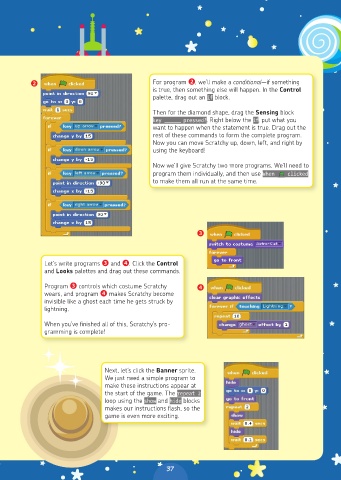
❷                                  For program ❷, we’ll make a conditional—if something
                                             is true, then something else will happen. In the Control
                                             palette, drag out an if block.

                                             Then for the diamond shape, drag the Sensing block
                                             key ______  pressed?. Right below the if, put what you
                                             want to happen when the statement is true. Drag out the
                                             rest of these commands to form the complete program.
                                             Now you can move Scratchy up, down, left, and right by
                                             using the keyboard!

                                             Now we’ll give Scratchy two more programs. We’ll need to
                                             program them individually, and then use When    clicked
                                             to make them all run at the same time.


                                                         ❸


              Let’s write programs ❸ and ❹. Click the Control
              and Looks palettes and drag out these commands.
              Program ❸ controls which costume Scratchy   ❹
              wears, and program ❹ makes Scratchy become
              invisible like a ghost each time he gets struck by
              lightning.

              When you’ve finished all of this, Scratchy’s pro-
              gramming is complete!


                               Next, let’s click the Banner sprite.
                               We just need a simple program to
                               make these instructions appear at
                               the start of the game. The repeat 2
                               loop using the show and hide blocks
                               makes our instructions flash, so the
                               game is even more exciting.


                                                37

