


Page 39 - Super Scratch Programming Adventure -1st Edition
P. 39
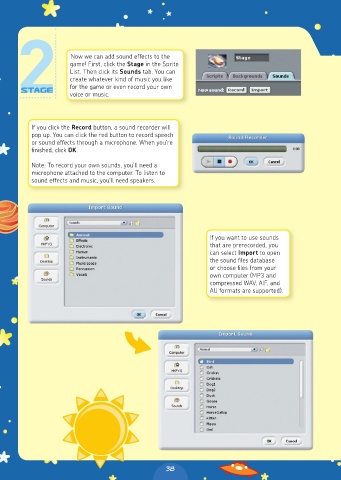
Now we can add sound effects to the
                     game! First, click the Stage in the Sprite
                     List. Then click its Sounds tab. You can
                     create whatever kind of music you like
                     for the game or even record your own
                     voice or music.


          If you click the Record button, a sound recorder will
          pop up. You can click the red button to record speech
          or sound effects through a microphone. When you’re
          finished, click OK.

          Note: To record your own sounds, you’ll need a
          microphone attached to the computer. To listen to
          sound effects and music, you’ll need speakers.


                                                             If you want to use sounds
                                                             that are prerecorded, you
                                                             can select Import to open
                                                             the sound files database
                                                             or choose files from your
                                                             own computer (MP3 and
                                                             compressed WAV, AIF, and
                                                             AU formats are supported).


                                                38

