


Page 156 - Scratch Programming Playground
P. 156
Save Point


                         Click the green flag to test the code so far. Make sure the
                         arrow keys correctly direct the snake head in all four direc-
                         tions: up, down, left, and right. Then click the red stop sign
                         and save your program.


                         explore: when key pressed
                         vs. if key pressed? Then


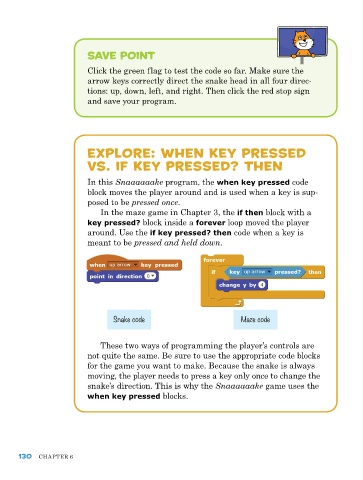
                         In this Snaaaaaake program, the when key pressed code
                         block moves the player around and is used when a key is sup-
                         posed to be pressed once.
                             In the maze game in Chapter 3, the if then block with a
                         key pressed? block inside a forever loop moved the player
                         around. Use the if key pressed? then code when a key is
                         meant to be pressed and held down.


                                 Snake code                         Maze code


                             These two ways of programming the player’s controls are
                         not quite the same. Be sure to use the appropriate code blocks
                         for the game you want to make. Because the snake is always
                         moving, the player needs to press a key only once to change the
                         snake’s direction. This is why the Snaaaaaake game uses the
                         when key pressed blocks.


      130   ChapTer 6

