


Page 175 - Scratch Programming Playground
P. 175
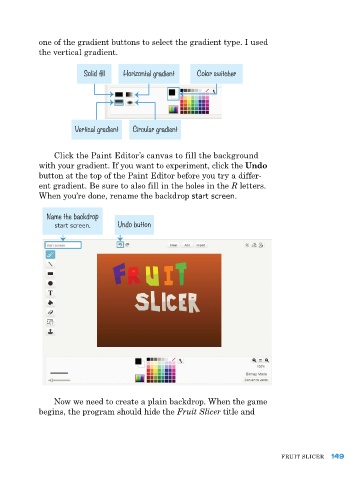
one of the gradient buttons to select the gradient type. I used
            the vertical gradient.


                        Solid fill  Horizontal gradient  Color switcher


                      Vertical gradient  Circular gradient


                Click the paint editor’s canvas to fill the background
            with your gradient. If you want to experiment, click the Undo
            button at the top of the paint editor before you try a differ-
            ent gradient. Be sure to also fill in the holes in the R letters.
            When you’re done, rename the backdrop start screen.


              Name the backdrop
                start screen.     Undo button


                Now we need to create a plain backdrop. When the game
            begins, the program should hide the Fruit Slicer title and


                                                                               FruIt SlICer  149

