


Page 177 - Scratch Programming Playground
P. 177
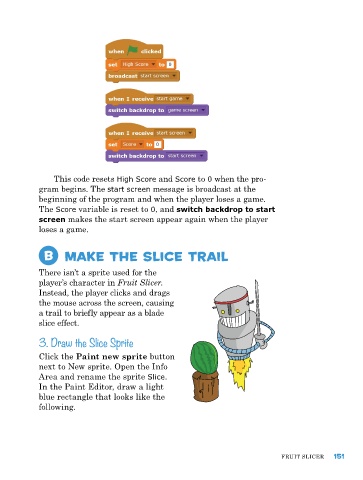
this code resets High Score and Score to 0 when the pro-
            gram begins. the start screen message is broadcast at the
            beginning of the program and when the player loses a game.
            the Score variable is reset to 0, and switch backdrop to start
            screen makes the start screen appear again when the player
            loses a game.


             B     Make the Slice trail


            there isn’t a sprite used for the
            player’s character in Fruit Slicer.
            Instead, the player clicks and drags
            the mouse across the screen, causing
            a trail to briefly appear as a blade
            slice effect.

            3. Draw the Slice Sprite

            Click the Paint new sprite button
            next to New sprite. Open the Info
            area and rename the sprite Slice.
            In the paint editor, draw a light
            blue rectangle that looks like the
            following.


                                                                               FruIt SlICer   151

