


Page 179 - Scratch Programming Playground
P. 179
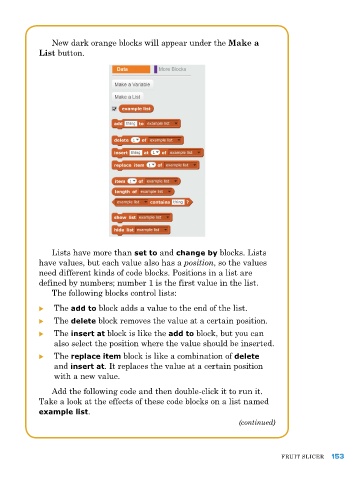
New dark orange blocks will appear under the Make a
            List button.


               lists have more than set to and change by blocks. lists
            have values, but each value also has a position, so the values
            need different kinds of code blocks. positions in a list are
            defined by numbers; number 1 is the first value in the list.
               the following blocks control lists:

            X X the add to block adds a value to the end of the list.
            X X the delete block removes the value at a certain position.
            X X the insert at block is like the add to block, but you can
                also select the position where the value should be inserted.
            X X the replace item block is like a combination of delete
                and insert at. It replaces the value at a certain position
                with a new value.
               add the following code and then double-click it to run it.
            take a look at the effects of these code blocks on a list named
            example list.
                                                                   (continued)


                                                                               FruIt SlICer  153

