


Page 192 - Scratch Programming Playground
P. 192
For the code to work with every fruit, the sliced fruit’s
                         costume number will be five more than the unsliced costume.
                         So the apple costume is costume 1, and the sliced apple is
                         costume 6. the banana costume is costume 2, and the sliced
                         banana is costume 7. this is the reason the order of the cos-
                         tumes is important. also, you need a second bomb costume
                         for costume 10. Duplicate the bomb costume, but you don’t
                         have to draw a sliced version of it.
                             the fruit costumes were drawn in Scratch’s Vector Mode,
                         which means they were drawn as a collection of shapes
                         rather than as a grid of pixels. although vector images look
                         better than bitmap images, vector images can’t be split in
                         half with the paint editor’s drawing tools. You’ll need to con-
                         vert the costumes to Bitmap Mode first.
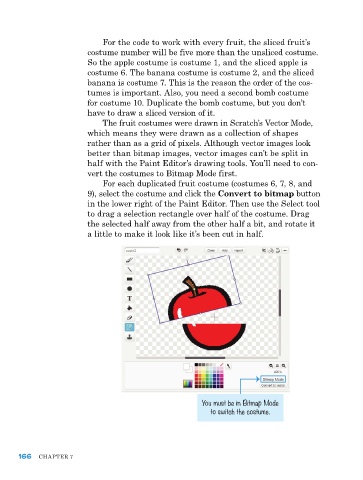
                             For each duplicated fruit costume (costumes 6, 7, 8, and
                         9), select the costume and click the Convert to bitmap button
                         in the lower right of the paint editor. then use the Select tool
                         to drag a selection rectangle over half of the costume. Drag
                         the selected half away from the other half a bit, and rotate it
                         a little to make it look like it’s been cut in half.


                                                         You must be in Bitmap Mode
                                                           to switch the costume.


      166   Chapter 7

