


Page 187 - Scratch Programming Playground
P. 187
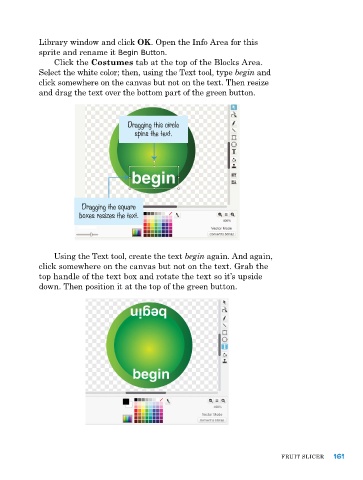
library window and click OK. Open the Info area for this
            sprite and rename it Begin Button.
                Click the Costumes tab at the top of the Blocks area.
            Select the white color; then, using the text tool, type begin and
            click somewhere on the canvas but not on the text. then resize
            and drag the text over the bottom part of the green button.


                                    Dragging this circle
                                      spins the text.


                        Dragging the square
                       boxes resizes the text.


                using the text tool, create the text begin again. and again,
            click somewhere on the canvas but not on the text. Grab the
            top handle of the text box and rotate the text so it’s upside
            down. then position it at the top of the green button.


                                                                               FruIt SlICer   161

