


Page 188 - Scratch Programming Playground
P. 188
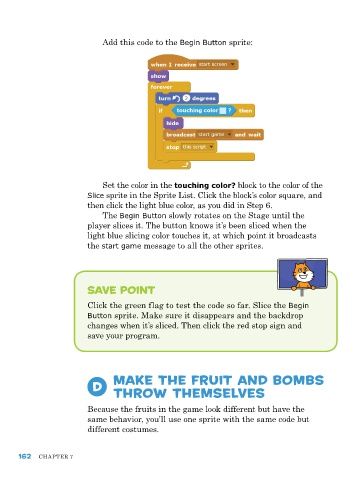
add this code to the Begin Button sprite:


                             Set the color in the touching color? block to the color of the
                         Slice sprite in the Sprite list. Click the block’s color square, and
                         then click the light blue color, as you did in Step 6.
                              the Begin Button slowly rotates on the Stage until the
                         player slices it. the button knows it’s been sliced when the
                         light blue slicing color touches it, at which point it broadcasts
                         the start game message to all the other sprites.


                         Save Point

                         Click the green flag to test the code so far. Slice the Begin
                         Button sprite. Make sure it disappears and the backdrop
                         changes when it’s sliced. then click the red stop sign and
                         save your program.


                           D     Make the Fruit and Bombs
                                 throw themselves

                         Because the fruits in the game look different but have the
                         same behavior, you’ll use one sprite with the same code but
                         different costumes.


      162   Chapter 7

