


Page 65 - Scratch Programming Playground
P. 65
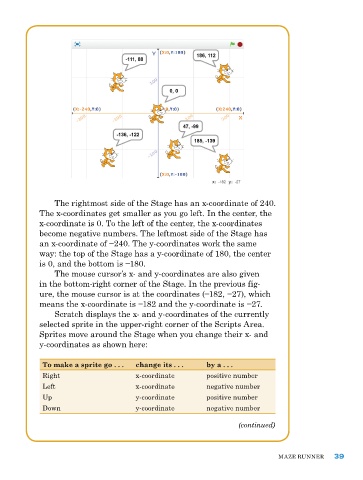
the rightmost side of the Stage has an x-coordinate of 240.
            the x-coordinates get smaller as you go left. In the center, the
            x-coordinate is 0. to the left of the center, the x-coordinates
            become negative numbers. the leftmost side of the Stage has
            an x-coordinate of −240. The y-coordinates work the same
            way: the top of the Stage has a y-coordinate of 180, the center
            is 0, and the bottom is −180.
                the mouse cursor’s x- and y-coordinates are also given
            in the bottom-right corner of the Stage. In the previous fig-
            ure, the mouse cursor is at the coordinates (−182, −27), which
            means the x-coordinate is −182 and the y-coordinate is −27.
                Scratch displays the x- and y-coordinates of the currently
            selected sprite in the upper-right corner of the Scripts area.
            Sprites move around the Stage when you change their x- and
            y-coordinates as shown here:

             To make a sprite go . . .  change its . . .  by a . . .

             right                     x-coordinate       positive number
             Left                      x-coordinate       negative number
             up                        y-coordinate       positive number
             Down                      y-coordinate       negative number

                                                                   (continued)


                                                                              Maze runner     39

