


Page 66 - Scratch Programming Playground
P. 66
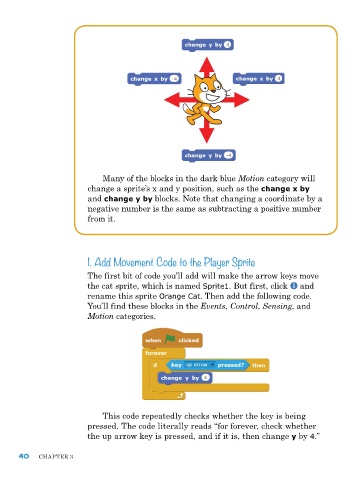
Many of the blocks in the dark blue Motion category will
                         change a sprite’s x and y position, such as the change x by
                         and change y by blocks. note that changing a coordinate by a
                         negative number is the same as subtracting a positive number
                         from it.


                         1. Add Movement Code to the Player Sprite

                         the first bit of code you’ll add will make the arrow keys move
                         the cat sprite, which is named Sprite1. But first, click   and
                         rename this sprite Orange Cat. then add the following code.
                         You’ll find these blocks in the Events, Control, Sensing, and
                         Motion categories.


                             this code repeatedly checks whether the key is being
                         pressed. the code literally reads “for forever, check whether
                         the up arrow key is pressed, and if it is, then change y by 4.”


      40    Chapter 3

