


Page 68 - Scratch Programming Playground
P. 68
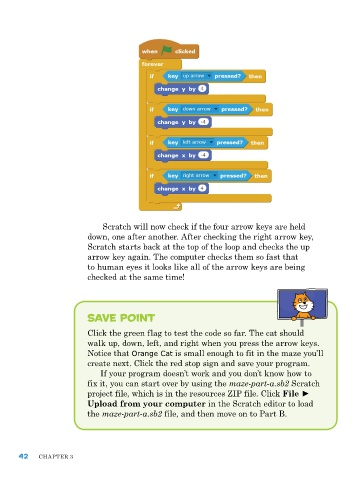
Scratch will now check if the four arrow keys are held
                         down, one after another. after checking the right arrow key,
                         Scratch starts back at the top of the loop and checks the up
                         arrow key again. the computer checks them so fast that
                         to human eyes it looks like all of the arrow keys are being
                         checked at the same time!


                         Save Point

                         Click the green flag to test the code so far. the cat should
                         walk up, down, left, and right when you press the arrow keys.
                         notice that Orange Cat is small enough to fit in the maze you’ll
                         create next. Click the red stop sign and save your program.
                             If your program doesn’t work and you don’t know how to
                         fix it, you can start over by using the maze-part-a.sb2 Scratch
                         project file, which is in the resources zIp file. Click File ►
                         Upload from your computer in the Scratch editor to load
                         the maze-part-a.sb2 file, and then move on to part B.


      42    Chapter 3

