


Page 168 - Programming With Python 3
P. 168
An Introduction to STEM Programming with Python — 2019-09-03a                              Page 155
            Chapter 14 — Relational Databases using the DB-API 2.0

            Executing Statements

             Free
            To execute SQL statements, you must 1) include the database module, 2) open a connection to your
            database and 3) create a cursor to contain the statement as it executes.

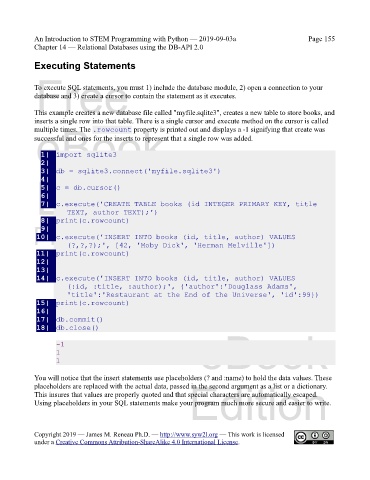
            This example creates a new database file called "myfile.sqlite3", creates a new table to store books, and
            inserts a single row into that table. There is a single cursor and execute method on the cursor is called
             eBook
            multiple times. The .rowcount property is printed out and displays a -1 signifying that create was
            successful and ones for the inserts to represent that a single row was added.

               1|  import sqlite3
               2|
               3|  db = sqlite3.connect('myfile.sqlite3')
             Edition
               4|
               5|  c = db.cursor()
               6|
               7|  c.execute('CREATE TABLE books (id INTEGER PRIMARY KEY, title
                       TEXT, author TEXT);')
               8|  print(c.rowcount)
            Please support this work at
               9|
             10|  c.execute('INSERT INTO books (id, title, author) VALUES
                       (?,?,?);', [42, 'Moby Dick', 'Herman Melville'])
             11|  print(c.rowcount)
             12|                  http://syw2l.org
             13|
             14|  c.execute('INSERT INTO books (id, title, author) VALUES
                                                                               Free
                       (:id, :title, :author);', {'author':'Douglass Adams',
                       'title':'Restaurant at the End of the Universe', 'id':99})
             15|  print(c.rowcount)
             16|
             17|  db.commit()
             18|  db.close()

                    -1
                    1                                              eBook
                    1

            You will notice that the insert statements use placeholders (? and :name) to hold the data values. These
                                                                Edition
            placeholders are replaced with the actual data, passed in the second argument as a list or a dictionary.
            This insures that values are properly quoted and that special characters are automatically escaped.
            Using placeholders in your SQL statements make your program much more secure and easier to write.


            Copyright 2019 — James M. Reneau Ph.D. — http://www.syw2l.org — This work is licensed
            under a Creative Commons Attribution-ShareAlike 4.0 International License.

