


Page 172 - Programming With Python 3
P. 172
An Introduction to STEM Programming with Python — 2019-09-03a                              Page 159
            Chapter 15 — Reading Data from the Web


             import urllib.request                                                                    Module
             Free
             Import the request module that us part of the urllib package. This module opens a
             connection to the web server and allows for retrieval of its output.


             https://docs.python.org/3/library/urllib.request.html


             urlopen(url)                                                             Method of urllib.request
             In its simple form, as shown here, it opens a connection to a web server to the
             resource specified in the URL. An HTTPResponse object is returned, if the URL
             eBook t will allow for reading the
             is a HTTP or HTTPS request. The returned objec
             returned data.
             Edition
             https://docs.python.org/3/library/urllib.request.html#urllib.request.urlopen


             read()                                                                Method of HTTPResponse
             read(amount)
            Please support this work at
             Read is method of HTTPresponse. It waits for the server to respond to the request
             and returns an array of bytes with data from the server. You may optionally
             specify the maximum number of bytes to reteieve.
                                  http://syw2l.org
             https://docs.python.org/3/library/http.client.html#http.client.HTTPResponse.read


                                                                               Free
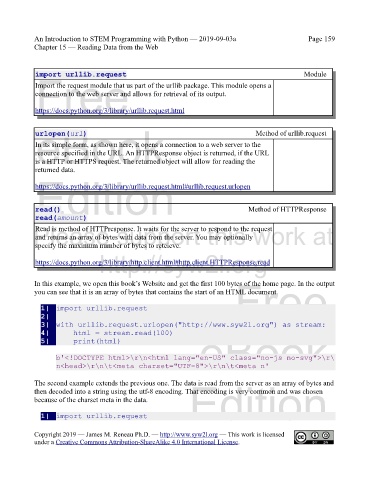
            In this example, we open this book’s Website and get the first 100 bytes of the home page. In the output
            you can see that it is an array of bytes that contains the start of an HTML document.


               1|  import urllib.request
               2|
               3|  with urllib.request.urlopen("http://www.syw2l.org") as stream:
               4|      html = stream.read(100)
               5|      print(html)                                 eBook

                    b'<!DOCTYPE html>\r\n<html lang="en-US" class="no-js no-svg">\r\
                    n<head>\r\n\t<meta charset="UTF-8">\r\n\t<meta n'

            The second example extends the previous one. The data is read from the server as an array of bytes and
            then decoded into a string using the utf-8 encoding. That encoding is very common and was chosen
            because of the charset meta in the data.            Edition

               1|  import urllib.request


            Copyright 2019 — James M. Reneau Ph.D. — http://www.syw2l.org — This work is licensed
            under a Creative Commons Attribution-ShareAlike 4.0 International License.

