


Page 219 - Programming With Python 3
P. 219
An Introduction to STEM Programming with Python — 2019-09-03a                              Page 206
            Chapter 20 — Using Tkinter to Make Screens

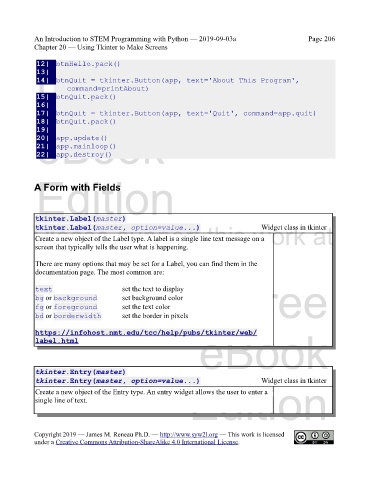
             12|  btnHello.pack()
             13|
             Free
             14|  btnQuit = tkinter.Button(app, text='About This Program',
                       command=printAbout)
             15|  btnQuit.pack()
             16|
             17|  btnQuit = tkinter.Button(app, text='Quit', command=app.quit)
             18|  btnQuit.pack()
             eBook
             19|
             20|  app.update()
             21|  app.mainloop()
             22|  app.destroy()


             Edition
            A Form with Fields


             tkinter.Label(master)
            Please support this work at
                                                                                       Widget class in tkinter
             tkinter.Label(master, option=value...)
             Create a new object of the Label type. A label is a single line text message on a
             screen that typically tells the user what is happening.
                                  http://syw2l.org
             There are many options that may be set for a Label, you can find them in the
             documentation page. The most common are:


             text                        set the text to display
             bg or background            set background color                  Free
             fg or foreground            set the text color
             bd or borderwidth           set the border in pixels


                                                                   eBook
             https://infohost.nmt.edu/tcc/help/pubs/tkinter/web/
             label.html


             tkinter.Entry(master)
             tkinter.Entry(master, option=value...)                                    Widget class in tkinter
             Create a new object of the Entry type. An entry widget allows the user to enter a
             single line of text.                               Edition


            Copyright 2019 — James M. Reneau Ph.D. — http://www.syw2l.org — This work is licensed
            under a Creative Commons Attribution-ShareAlike 4.0 International License.

