


Page 200 - Basic Course
P. 200
KNX BASIC COURSE


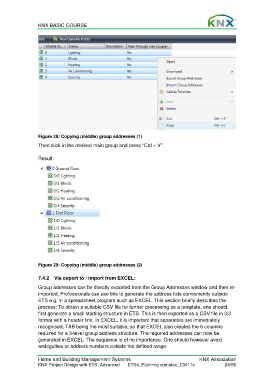
                  Figure 28: Copying (middle) group addresses (1)

                  Then click in the desired main group and press “Ctrl + V”.

                  Result:


                  Figure 29: Copying (middle) group addresses (2)

                  7.4.2  Via export to / import from EXCEL:

                  Group addresses can be directly exported from the Group Addresses window and then re-
                  imported. Professionals can use this to generate the address lists conveniently outside
                  ETS e.g. in a spreadsheet program such as EXCEL. This section briefly describes the
                  process: To obtain a suitable CSV file for further processing as a template, one should
                  first generate a small starting structure in ETS. This is then exported as a CSV file in 3/3
                  format with a header line. In EXCEL, it is important that separators are immediately
                  recognised, TAB being the most suitable, so that EXCEL also creates the 6 columns
                  required for a 3-level group address structure. The required addresses can now be
                  generated in EXCEL. The sequence is of no importance. One should however avoid
                  ambiguities or address numbers outside the defined range.


                  Home and Building Management Systems                                    KNX Association
                  KNX Project Design with ETS: Advanced   ETS4_Planning complex_E0411c               24/59

