


Page 203 - Basic Course
P. 203
KNX BASIC COURSE


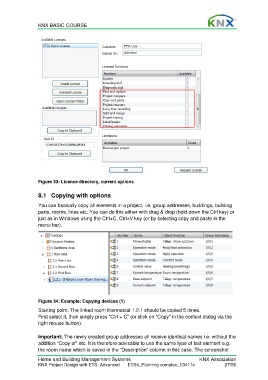
                  Figure 33: Licence directory, current options

                  8.1  Copying with options

                  You can basically copy all elements in a project, i.e. group addresses, buildings, building
                  parts, rooms, lines etc. You can do this either with drag & drop (hold down the Ctrl key) or
                  just as in Windows using the Ctrl+C, Ctrl+V key (or by selecting copy and paste in the
                  menu bar).


                  Figure 34: Example: Copying devices (1)
                  Starting point: The linked room thermostat 1.2.1 should be copied 5 times.
                  First select it, then simply press “Ctrl + C” (or click on “Copy” in the context dialog via the
                  right mouse button).

                  Important: The newly created group addresses all receive identical names i.e. without the
                  addition “Copy of” etc. It is therefore advisable to use the same type of text element e.g.
                  the room name which is saved in the “Description” column in this case. The screenshot

                  Home and Building Management Systems                                    KNX Association
                  KNX Project Design with ETS: Advanced   ETS4_Planning complex_E0411c               27/59

