


Page 205 - Basic Course
P. 205
KNX BASIC COURSE


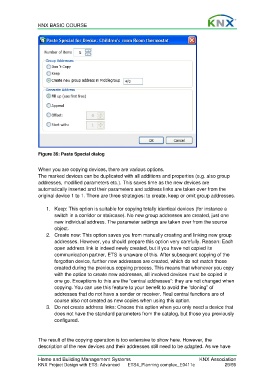
                  Figure 36: Paste Special dialog

                  When you are copying devices, there are various options.
                  The marked devices can be duplicated with all additions and properties (e.g. also group
                  addresses, modified parameters etc.). This saves time as the new devices are
                  automatically inserted and their parameters and address links are taken over from the
                  original device 1 to 1. There are three strategies: to create, keep or omit group addresses.

                      1.  Keep: This option is suitable for copying totally identical devices (for instance a
                         switch in a corridor or staircase). No new group addresses are created, just one
                         new individual address. The parameter settings are taken over from the source
                         object.
                      2.  Create new: This option saves you from manually creating and linking new group
                         addresses. However, you should prepare this option very carefully. Reason: Each
                         open address link is indeed newly created, but if you have not copied its
                         communication partner, ETS is unaware of this. After subsequent copying of the
                         forgotten device, further new addresses are created, which do not match those
                         created during the previous copying process. This means that whenever you copy
                         with the option to create new addresses, all involved devices must be copied in
                         one go. Exceptions to this are the “central addresses”: they are not changed when
                         copying. You can use this feature to your benefit to avoid the “cloning” of
                         addresses that do not have a sender or receiver. Real central functions are of
                         course also not created as new copies when using this option.
                      3.  Do not create address links: Choose this option when you only need a device that
                         does not have the standard parameters from the catalog, but those you previously
                         configured.


                  The result of the copying operation is too extensive to show here. However, the
                  description of the new devices and their addresses still need to be adapted. As we have


                  Home and Building Management Systems                                    KNX Association
                  KNX Project Design with ETS: Advanced   ETS4_Planning complex_E0411c               29/59

